
Top 10 Free AI Tools for Social Media Scheduling
Introduction: Why Social Media Scheduling Matters for Students
In today’s fast-moving digital world, social media is more than just entertainment. For many students, it’s a platform to share ideas, build personal brands, launch small businesses, or even make money online. Instagram, TikTok, YouTube, and LinkedIn have turned into tools for growth and income. But while the opportunities are huge, the challenge is real: consistency.
To grow on social media, you need to post regularly, engage with your audience, and maintain a clear strategy. But students are already balancing lectures, assignments, part-time jobs, and personal responsibilities. Finding the time to manually post content every day can feel impossible. That’s where AI-powered social media scheduling tools make life easier.
These tools allow you to:
-
Schedule posts in advance (so you don’t have to post in real time).
-
Use AI to generate captions, hashtags, and even content ideas.
-
Analyze performance to know what’s working and what’s not.
-
Save hours every week, freeing up more time for studies or side hustles.
The best part? Many of these tools offer free plans designed for beginners, students, and small creators. They might have some limitations, but they’re powerful enough to help you stay consistent and grow.
In this guide, you’ll discover the top free AI tools for social media scheduling in 2025. Each tool has been reviewed with:
-
Step-by-step tutorials (how to use them).
-
Pros and cons.
-
Real-life examples (how students can apply them).
-
Best-for comparisons (e.g., best for Instagram, best for analytics).
You’ll also get a comparison table, bonus tips, and common mistakes to avoid so you can choose the right tool without wasting time.
Top 10 Free AI Tools for Social Media Scheduling
Here are the best free tools students can use to schedule, automate, and grow their social media content strategy.
1. Buffer – Best for Beginners
Overview:
Buffer is one of the most popular tools for students and small creators. Known for its clean and simple interface, it makes social media scheduling stress-free. Its free plan is perfect for beginners who don’t want to feel overwhelmed.
How to Use Buffer (Step-by-Step):
-
Go to buffer.com and sign up.
-
Connect up to 3 social media accounts (Instagram, LinkedIn, X, or Facebook).
-
Create your post (text, image, or video).
-
Use Buffer’s AI caption generator to improve engagement.
-
Pick a posting time or let Buffer auto-schedule for best results.
Pros:
-
Clean design, very beginner-friendly.
-
Free plan supports up to 3 accounts.
-
AI captions + post ideas.
-
Mobile app available.
Cons:
-
Free plan limits scheduling to 10 posts at a time.
-
Limited analytics on free tier.
Real-Life Example:
Imagine you’re running a college club Instagram page. Instead of posting reminders manually before every event, you can schedule a full week’s content (like event posters, quotes, and photos) in one sitting. Buffer makes it easy.
Best For: Beginners and students who want a stress-free start.

2. Hootsuite (Free Plan) – Best for Multi-Platform Scheduling
Overview:
Hootsuite is a veteran in the world of social media management. Its free plan is limited but still powerful, especially for students handling multiple platforms.
How to Use Hootsuite:
-
Sign up at hootsuite.com.
-
Connect 2 social media accounts.
-
Write your post and upload media.
-
Use the AI-powered time suggestions to optimize reach.
-
Track engagement in the built-in dashboard.
Pros:
-
Covers multiple platforms.
-
Advanced scheduling suggestions.
-
Built-in content calendar.
Cons:
-
Free plan allows only 2 accounts and 5 scheduled posts.
-
Advanced features require paid upgrade.
Real-Life Example:
If you manage both a LinkedIn profile for career growth and an Instagram account for personal branding, Hootsuite helps keep both active without confusion.
Best For: Students juggling multiple platforms.
3. Later – Best for Instagram & TikTok
Overview:
Later is loved by content creators because of its visual drag-and-drop calendar. It’s one of the easiest tools for Instagram and TikTok planning.
How to Use Later:
-
Create a free account at later.com.
-
Upload photos and videos to your media library.
-
Drag content into the calendar slots.
-
Use Later’s AI hashtag suggestions to maximize reach.
-
Schedule posts with automatic publishing.
Pros:
-
Great for Instagram & TikTok.
-
Drag-and-drop visual planner.
-
Hashtag suggestions.
-
Free plan allows 30 posts per month.
Cons:
-
Free plan only supports 1 account.
-
Advanced analytics are locked.
Real-Life Example:
A student posting fashion reels on TikTok can line up an entire month’s content and see how it looks visually before publishing.
Best For: Visual planners and Instagram/TikTok creators.
4. Canva Content Planner – Best for Creatives
Overview:
Canva is already popular for designing posts, but few students realize it also has a built-in content planner. You can design and schedule posts directly in one platform.
How to Use Canva Planner:
-
Log in at canva.com.
-
Design your post using free templates.
-
Click “Share → Schedule”.
-
Choose your connected account and posting time.
Pros:
-
All-in-one design + scheduling.
-
Free templates for students.
-
Perfect for Instagram aesthetics.
Cons:
-
Free plan only allows scheduling to 1 account.
-
Limited analytics.
Real-Life Example:
If you’re promoting your student-run startup, Canva lets you design posts (logos, banners, product photos) and schedule them instantly—no extra software needed.
Best For: Students who love designing.
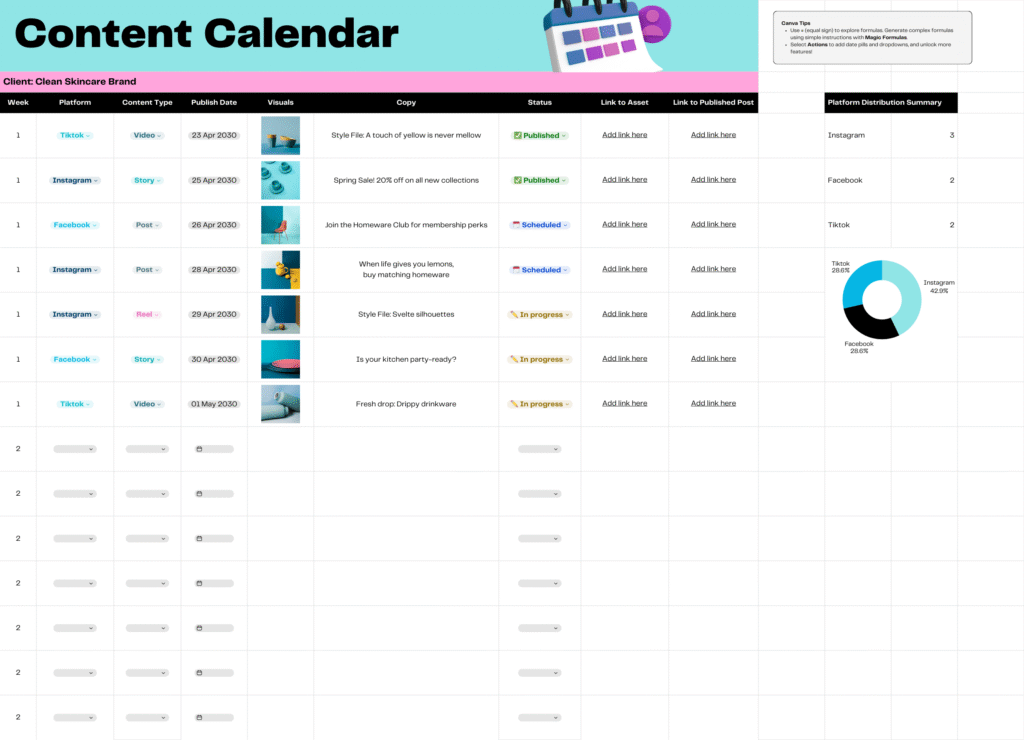
5. Zoho Social – Best for Teams & Group Projects
Overview:
Zoho Social is great for team collaboration. If you’re running a student club or group project, this tool allows multiple people to plan content together.
How to Use Zoho Social:
-
Create an account at zoho.com/social.
-
Connect your brand or account.
-
Invite teammates to collaborate.
-
Use the shared calendar to plan posts.
Pros:
-
Collaboration features.
-
Advanced content calendar.
-
Works well for group accounts.
Cons:
-
Free plan limits you to 7 scheduled posts.
-
Complex for solo creators.
Real-Life Example:
A university debate society can use Zoho to schedule event promos, highlight winners, and share updates—without relying on one person.
Best For: Group projects and clubs.
6. Crowdfire – Best for AI Hashtag Suggestions
Overview:
Crowdfire is an underrated gem. Its biggest strength is AI hashtag generation and content curation.
How to Use Crowdfire:
-
Sign up at crowdfireapp.com.
-
Connect up to 3 accounts.
-
Upload content or let Crowdfire suggest trending articles.
-
Add AI-generated hashtags.
Pros:
-
AI hashtags for better reach.
-
Content curation suggestions.
-
Free plan supports 3 accounts.
Cons:
-
Interface feels outdated.
-
Limited analytics.
Real-Life Example:
If you’re a student trying to grow a motivational quote page, Crowdfire saves time by suggesting daily content ideas.
Best For: Students needing hashtag support.
7. Metricool – Best for Analytics Lovers
Overview:
Metricool is more than just a scheduler—it’s a data-driven tool that helps you understand which posts perform best.
How to Use Metricool:
-
Sign up at metricool.com.
-
Connect your accounts.
-
Use the dashboard to analyze engagement.
-
Schedule posts using AI time suggestions.
Pros:
-
Detailed analytics.
-
Competitor analysis.
-
Free plan supports 1 account.
Cons:
-
Free plan limited to 50 scheduled posts.
-
Learning curve for beginners.
Real-Life Example:
A student running a fitness page can track which workout videos perform best and adjust strategy.
Best For: Students serious about analytics.
8. Postly AI – Best for AI-Powered Captions
Overview:
Postly combines AI copywriting + scheduling in one platform. It’s great for students who struggle to write captions.
How to Use Postly:
-
Go to postly.ai.
-
Enter your topic and let AI generate captions.
-
Edit and schedule to multiple accounts.
Pros:
-
AI captions.
-
Multi-platform posting.
-
Free plan available.
Cons:
-
Free version has limited posts.
-
Newer tool (less stable).
Real-Life Example:
A student food blogger can auto-generate creative captions like “Budget-friendly meals for hostel students” in seconds.
Best For: Students struggling with captions.
9. RecurPost – Best for Recycling Old Content
Overview:
RecurPost focuses on evergreen content recycling—perfect for students who don’t have time to create new posts every day.
How to Use RecurPost:
-
Create an account at recurpost.com.
-
Upload evergreen posts (quotes, promos, tips).
-
RecurPost will recycle them on rotation.
Pros:
-
Saves time with recycling.
-
Good for evergreen content.
-
Free plan supports 3 accounts.
Cons:
-
Not ideal for trend-driven creators.
-
Limited analytics.
Real-Life Example:
If you run a study tips page, you can recycle exam tips every semester without rewriting.
Best For: Time-strapped students.
10. SocialBee (Free Trial for Students) – Best for Long-Term Growth
Overview:
SocialBee is known for its content categories and structured posting. It’s excellent for building a professional brand.
How to Use SocialBee:
-
Sign up at socialbee.com.
-
Set categories (quotes, promos, tips).
-
Fill each category with posts.
-
Schedule based on strategy.
Pros:
-
Category-based posting.
-
Professional features.
-
Free trial for students.
Cons:
-
Free trial only (not permanent).
-
Slightly advanced for beginners.
Real-Life Example:
A student building a LinkedIn personal brand can schedule career tips, achievements, and articles systematically.
Best For: Students preparing for professional careers.
Comparison Table: Top 10 Free AI Tools for Social Media Scheduling
| Tool | Best For | Free Plan Limitations | Unique Feature |
|---|---|---|---|
| Buffer | Beginners | 3 accounts, 10 posts | AI captions, clean UI |
| Hootsuite | Multi-platform management | 2 accounts, 5 posts | Team scheduling |
| Later | Instagram & TikTok | 1 account, 30 posts | Visual planner |
| Canva | Creative students | 1 account | AI + design planner |
| Zoho Social | Teams & projects | 1 brand, 7 posts | Collaboration tools |
| Crowdfire | Hashtags & engagement | 3 accounts | AI hashtags |
| Metricool | Analytics & reports | 1 account, 50 posts | Performance tracking |
| Postly AI | AI captions | Limited schedule | AI copywriting |
| RecurPost | Recycling content | 3 accounts, 10 posts | Evergreen posting |
| SocialBee | Growth strategies | Free trial | Content categories |
Bonus Tips: Best Practices & Common Mistakes
Best Practices:
-
Be consistent with posting.
-
Use AI hashtags for better reach.
-
Mix promotional and engaging content.
-
Review analytics weekly.
Common Mistakes:
-
Posting the same content on all platforms without adjustments.
-
Ignoring comments and DMs.
-
Over-relying on automation (audiences want human interaction).
FAQs: Top 10 Free AI Tools for Social Media Scheduling
Q1: What is the best free AI tool for students to schedule posts?
Buffer and Later are the most student-friendly.
Q2: Can I schedule TikTok videos for free?
Yes, Later supports TikTok scheduling.
Q3: Does Canva allow free scheduling?
Yes, Canva Content Planner works with 1 account on the free plan.
Q4: Which tool is best for analytics?
Metricool provides the most detailed free analytics.
Q5: Can students make money with these tools?
Yes, by managing social media accounts for small businesses as freelancers.
Conclusion: Top 10 Free AI Tools for Social Media Scheduling
Social media is no longer just a place to post random updates. Today, it is one of the most powerful platforms for students, freelancers, and small business owners to build influence, create income streams, and grow their brands. But without the right tools, it quickly becomes overwhelming. This is where AI-powered social media scheduling tools make all the difference.
Instead of spending hours posting manually, these tools let you plan, automate, analyze, and even repurpose content. Whether you are a student looking for growth tools, a freelancer managing multiple accounts, or a small business owner trying to save time, free AI tools can give you a professional edge.
Why Students Need Social Media Growth Tools
Students often juggle classes, side hustles, and part-time jobs. That’s why student social media growth tools are so valuable—they allow you to grow your online presence without wasting hours every day. With the right apps, you can:
-
Schedule Instagram posts during exams or busy weeks.
-
Use an AI hashtag generator for Instagram to get maximum reach on your content.
-
Automate TikTok uploads with free apps to schedule TikTok videos so your profile stays active while you focus on studies.
In short, these tools save time and bring professional results—even if you’re just starting out.
Tools That Work for Small Business Owners Too
It’s not only students who benefit. Social media tools for small business owners are essential for managing customer relationships, promoting products, and running ads effectively. Platforms like Buffer, Zoho Social, and SocialBee help businesses keep a consistent online presence without hiring a full-time marketer.
The best part? Students who master these tools can offer social media management as a service to small businesses and start earning from it.
AI Tools for Freelancers in 2025
Freelancers in 2025 cannot ignore AI anymore. From content scheduling to caption generation, AI tools are becoming standard. Here’s how you can use them as a freelancer:
-
Content Repurposing AI Tools → Turn one TikTok video into Instagram Reels, YouTube Shorts, and even LinkedIn posts.
-
AI Hashtag Generator for Instagram → Quickly find trending hashtags for your niche.
-
Time-Saving Social Media Hacks for Students and Freelancers → Batch-schedule posts for a week in one sitting, then focus on client work or studies.
By learning these tools now, students can start freelancing without experience and get ahead in the digital market.
Final Words
So, the big question remains:
Which Tool Should You Choose?
AI-powered social media scheduling tools are no longer limited to big companies. As a student, you can take advantage of these free platforms to:
-
Build and grow your personal brand.
-
Start side hustles with minimal effort.
-
Manage social accounts for businesses and earn income.
👉 If you are just starting out, Buffer or Later is simple and effective.
👉 If you want detailed analytics, Metricool is the winner.
👉 For design-focused creators, Canva Planner is unbeatable.
Now it’s your turn:
Which tool will you try first? Share your favorite in the comments below!
🔗 Suggested External Links (trusted authority sites)
🔗 Suggested Internal Links
- Best 10 Digital Product Ideas for Canva Beginners
- Best 5 Free AI Tools for Writing Blog Posts
- Top 5 Free AI Voiceover Tools for Creating YouTube Videos
- Best 5 Digital Products Design in Canva and Sell on Etsy
- How to Use Quora to Increase Blog Traffic in 2025
- Best 5 Free AI Video Editing Tools for Beginners No Watermark
- 10 best Investment Passive Income Ideas for College Students
- Top 10 AI-Powered SEO Tools Every Blogger Should Use to Rank Higher
- 10 Free AI Tools for Instagram Content Creation
Top 10 Free AI Tools for Social Media Scheduling Top 10 Free AI Tools for Social Media Scheduling Top 10 Free AI Tools for Social Media Scheduling Top 10 Free AI Tools for Social Media Scheduling Top 10 Free AI Tools for Social Media Scheduling Top 10 Free AI Tools for Social Media Scheduling
Top 10 Free AI Tools for Social Media Scheduling Top 10 Free AI Tools for Social Media Scheduling Top 10 Free AI Tools for Social Media Scheduling Top 10 Free AI Tools for Social Media Scheduling Top 10 Free AI Tools for Social Media Scheduling Top 10 Free AI Tools for Social Media Scheduling
Top 10 Free AI Tools for Social Media Scheduling Top 10 Free AI Tools for Social Media Scheduling Top 10 Free AI Tools for Social Media Scheduling Top 10 Free AI Tools for Social Media Scheduling Top 10 Free AI Tools for Social Media Scheduling Top 10 Free AI Tools for Social Media Scheduling Top 10 Free AI Tools for Social Media Scheduling Top 10 Free AI Tools for Social Media Scheduling Top 10 Free AI Tools for Social Media Scheduling